





LDAP made easy.
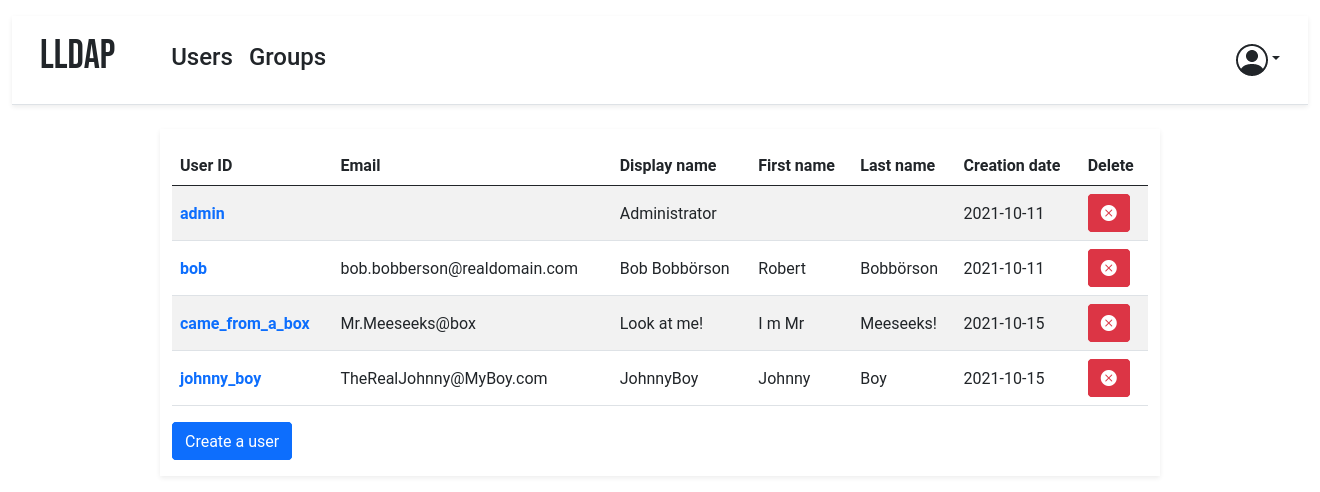 It comes with a frontend that makes user management easy, and allows users to
edit their own details or reset their password by email.
The goal is _not_ to provide a full LDAP server; if you're interested in that,
check out OpenLDAP. This server is a user management system that is:
- simple to setup (no messing around with `slapd`),
- simple to manage (friendly web UI),
- low resources,
- opinionated with basic defaults so you don't have to understand the
subtleties of LDAP.
It mostly targets self-hosting servers, with open-source components like
Nextcloud, Airsonic and so on that only support LDAP as a source of external
authentication.
For more features (OAuth/OpenID support, reverse proxy, ...) you can install
other components (KeyCloak, Authelia, ...) using this server as the source of
truth for users, via LDAP.
By default, the data is stored in SQLite, but you can swap the backend with
MySQL/MariaDB or PostgreSQL.
## Installation
It's possible to install lldap from OCI images ([docker](docs/install.md#with-docker)/[podman](docs/install.md#with-podman)), from [Kubernetes](docs/install.md#with-kubernetes), [TrueNAS](docs/install.md#truenas-scale), or from [a regular distribution package manager](docs/install.md/#from-a-package-repository) (Archlinux, Debian, CentOS, Fedora, OpenSuse, Ubuntu, FreeBSD).
Building [from source](docs/install.md#from-source) and [cross-compiling](docs/install.md#cross-compilation) to a different hardware architecture is also supported.
## Usage
The simplest way to use LLDAP is through the web front-end. There you can
create users, set passwords, add them to groups and so on. Users can also
connect to the web UI and change their information, or request a password reset
link (if you configured the SMTP client).
You can create and manage custom attributes through the Web UI, or through the
community-contributed CLI frontend (
[Zepmann/lldap-cli](https://github.com/Zepmann/lldap-cli)). This is necessary
for some service integrations.
The [bootstrap.sh](scripts/bootstrap.sh) script can enforce a list of
users/groups/attributes from a given file, reflecting it on the server.
To manage the user, group and membership lifecycle in an infrastructure-as-code
scenario you can use the unofficial [LLDAP terraform provider in the terraform registry](https://registry.terraform.io/providers/tasansga/lldap/latest).
LLDAP is also very scriptable, through its GraphQL API. See the
[Scripting](docs/scripting.md) docs for more info.
### Recommended architecture
If you are using containers, a sample architecture could look like this:
- A reverse proxy (e.g. nginx or Traefik)
- An authentication service (e.g. Authelia, Authentik or KeyCloak) connected to
LLDAP to provide authentication for non-authenticated services, or to provide
SSO with compatible ones.
- The LLDAP service, with the web port exposed to Traefik.
- The LDAP port doesn't need to be exposed, since only the other containers
will access it.
- You can also set up LDAPS if you want to expose the LDAP port to the
internet (not recommended) or for an extra layer of security in the
inter-container communication (though it's very much optional).
- The default LLDAP container starts up as root to fix up some files'
permissions before downgrading the privilege to the given user. However,
you can (should?) use the `*-rootless` version of the images to be able to
start directly as that user, once you got the permissions right. Just don't
forget to change from the `UID/GID` env vars to the `uid` docker-compose
field.
- Any other service that needs to connect to LLDAP for authentication (e.g.
NextCloud) can be added to a shared network with LLDAP. The finest
granularity is a network for each pair of LLDAP-service, but there are often
coarser granularities that make sense (e.g. a network for the \*arr stack and
LLDAP).
## Client configuration
### Known compatible services
Most services that can use LDAP as an authentication provider should work out
of the box. For new services, it's possible that they require a bit of tweaking
on LLDAP's side to make things work. In that case, just create an issue with
the relevant details (logs of the service, LLDAP logs with `verbose=true` in
the config).
Some specific clients have been tested to work and come with sample
configuration files, or guides. See the [`example_configs`](example_configs/README.md)
folder for example configs for integration with specific services.
Integration with Linux accounts is possible, through PAM and nslcd. See [PAM
configuration guide](example_configs/pam/README.md). Integration with Windows (e.g. Samba) is WIP.
### General configuration guide
To configure the services that will talk to LLDAP, here are the values:
- The LDAP user DN is from the configuration. By default,
`cn=admin,ou=people,dc=example,dc=com`.
- The LDAP password is from the configuration (same as to log in to the web
UI).
- The users are all located in `ou=people,` + the base DN, so by default user
`bob` is at `cn=bob,ou=people,dc=example,dc=com`.
- Similarly, the groups are located in `ou=groups`, so the group `family`
will be at `cn=family,ou=groups,dc=example,dc=com`.
Testing group membership through `memberOf` is supported, so you can have a
filter like: `(memberOf=cn=admins,ou=groups,dc=example,dc=com)`.
The administrator group for LLDAP is `lldap_admin`: anyone in this group has
admin rights in the Web UI. Most LDAP integrations should instead use a user in
the `lldap_strict_readonly` or `lldap_password_manager` group, to avoid granting full
administration access to many services. To prevent privilege escalation users in the
`lldap_password_manager` group are not allowed to change passwords of admins in the
`lldap_admin` group.
### Incompatible services
Though we try to be maximally compatible, not every feature is supported; LLDAP
is not a fully-featured LDAP server, intentionally so.
LDAP browsing tools are generally not supported, though they could be. If you
need to use one but it behaves weirdly, please file a bug.
Some services use features that are not implemented, or require specific
attributes. You can try to create those attributes (see custom attributes in
the [Usage](#usage) section).
Finally, some services require password hashes so they can validate themselves
the user's password without contacting LLDAP. This is not and will not be
supported, it's incompatible with our password hashing scheme (a zero-knowledge
proof). Furthermore, it's generally not recommended in terms of security, since
it duplicates the places from which a password hash could leak.
In that category, the most prominent is Synology. It is, to date, the only
service that seems definitely incompatible with LLDAP.
## Frequently Asked Questions
- [I can't login](docs/faq.md#i-cant-log-in)
- [Discord Integration](docs/faq.md#discord-integration)
- [Migrating from SQLite](docs/faq.md#migrating-from-sqlite)
- How does lldap compare [with OpenLDAP](docs/faq.md#how-does-lldap-compare-with-openldap)? [With FreeIPA](docs/faq.md#how-does-lldap-compare-with-freeipa)? [With Kanidm](docs/faq.md#how-does-lldap-compare-with-kanidm)?
- [Does lldap support vhosts?](docs/faq.md#does-lldap-support-vhosts)
- [Does lldap provide commercial support contracts?](docs/faq.md#does-lldap-provide-commercial-support-contracts)
- [Can I make a donation to fund development?](docs/faq.md#can-i-make-a-donation-to-fund-development)
- [Is lldap sustainable? Can we depend on it for our infrastructure?](docs/faq.md#is-lldap-sustainable-can-we-depend-on-it-for-our-infrastructure)
## Contributions
Contributions are welcome! Just fork and open a PR. Or just file a bug.
We don't have a code of conduct, just be respectful and remember that it's just
normal people doing this for free on their free time.
Make sure that you run `cargo fmt` from the root before creating the PR. And if
you change the GraphQL interface, you'll need to regenerate the schema by
running `./export_schema.sh`.
Join our [Discord server](https://discord.gg/h5PEdRMNyP) if you have any
questions!
It comes with a frontend that makes user management easy, and allows users to
edit their own details or reset their password by email.
The goal is _not_ to provide a full LDAP server; if you're interested in that,
check out OpenLDAP. This server is a user management system that is:
- simple to setup (no messing around with `slapd`),
- simple to manage (friendly web UI),
- low resources,
- opinionated with basic defaults so you don't have to understand the
subtleties of LDAP.
It mostly targets self-hosting servers, with open-source components like
Nextcloud, Airsonic and so on that only support LDAP as a source of external
authentication.
For more features (OAuth/OpenID support, reverse proxy, ...) you can install
other components (KeyCloak, Authelia, ...) using this server as the source of
truth for users, via LDAP.
By default, the data is stored in SQLite, but you can swap the backend with
MySQL/MariaDB or PostgreSQL.
## Installation
It's possible to install lldap from OCI images ([docker](docs/install.md#with-docker)/[podman](docs/install.md#with-podman)), from [Kubernetes](docs/install.md#with-kubernetes), [TrueNAS](docs/install.md#truenas-scale), or from [a regular distribution package manager](docs/install.md/#from-a-package-repository) (Archlinux, Debian, CentOS, Fedora, OpenSuse, Ubuntu, FreeBSD).
Building [from source](docs/install.md#from-source) and [cross-compiling](docs/install.md#cross-compilation) to a different hardware architecture is also supported.
## Usage
The simplest way to use LLDAP is through the web front-end. There you can
create users, set passwords, add them to groups and so on. Users can also
connect to the web UI and change their information, or request a password reset
link (if you configured the SMTP client).
You can create and manage custom attributes through the Web UI, or through the
community-contributed CLI frontend (
[Zepmann/lldap-cli](https://github.com/Zepmann/lldap-cli)). This is necessary
for some service integrations.
The [bootstrap.sh](scripts/bootstrap.sh) script can enforce a list of
users/groups/attributes from a given file, reflecting it on the server.
To manage the user, group and membership lifecycle in an infrastructure-as-code
scenario you can use the unofficial [LLDAP terraform provider in the terraform registry](https://registry.terraform.io/providers/tasansga/lldap/latest).
LLDAP is also very scriptable, through its GraphQL API. See the
[Scripting](docs/scripting.md) docs for more info.
### Recommended architecture
If you are using containers, a sample architecture could look like this:
- A reverse proxy (e.g. nginx or Traefik)
- An authentication service (e.g. Authelia, Authentik or KeyCloak) connected to
LLDAP to provide authentication for non-authenticated services, or to provide
SSO with compatible ones.
- The LLDAP service, with the web port exposed to Traefik.
- The LDAP port doesn't need to be exposed, since only the other containers
will access it.
- You can also set up LDAPS if you want to expose the LDAP port to the
internet (not recommended) or for an extra layer of security in the
inter-container communication (though it's very much optional).
- The default LLDAP container starts up as root to fix up some files'
permissions before downgrading the privilege to the given user. However,
you can (should?) use the `*-rootless` version of the images to be able to
start directly as that user, once you got the permissions right. Just don't
forget to change from the `UID/GID` env vars to the `uid` docker-compose
field.
- Any other service that needs to connect to LLDAP for authentication (e.g.
NextCloud) can be added to a shared network with LLDAP. The finest
granularity is a network for each pair of LLDAP-service, but there are often
coarser granularities that make sense (e.g. a network for the \*arr stack and
LLDAP).
## Client configuration
### Known compatible services
Most services that can use LDAP as an authentication provider should work out
of the box. For new services, it's possible that they require a bit of tweaking
on LLDAP's side to make things work. In that case, just create an issue with
the relevant details (logs of the service, LLDAP logs with `verbose=true` in
the config).
Some specific clients have been tested to work and come with sample
configuration files, or guides. See the [`example_configs`](example_configs/README.md)
folder for example configs for integration with specific services.
Integration with Linux accounts is possible, through PAM and nslcd. See [PAM
configuration guide](example_configs/pam/README.md). Integration with Windows (e.g. Samba) is WIP.
### General configuration guide
To configure the services that will talk to LLDAP, here are the values:
- The LDAP user DN is from the configuration. By default,
`cn=admin,ou=people,dc=example,dc=com`.
- The LDAP password is from the configuration (same as to log in to the web
UI).
- The users are all located in `ou=people,` + the base DN, so by default user
`bob` is at `cn=bob,ou=people,dc=example,dc=com`.
- Similarly, the groups are located in `ou=groups`, so the group `family`
will be at `cn=family,ou=groups,dc=example,dc=com`.
Testing group membership through `memberOf` is supported, so you can have a
filter like: `(memberOf=cn=admins,ou=groups,dc=example,dc=com)`.
The administrator group for LLDAP is `lldap_admin`: anyone in this group has
admin rights in the Web UI. Most LDAP integrations should instead use a user in
the `lldap_strict_readonly` or `lldap_password_manager` group, to avoid granting full
administration access to many services. To prevent privilege escalation users in the
`lldap_password_manager` group are not allowed to change passwords of admins in the
`lldap_admin` group.
### Incompatible services
Though we try to be maximally compatible, not every feature is supported; LLDAP
is not a fully-featured LDAP server, intentionally so.
LDAP browsing tools are generally not supported, though they could be. If you
need to use one but it behaves weirdly, please file a bug.
Some services use features that are not implemented, or require specific
attributes. You can try to create those attributes (see custom attributes in
the [Usage](#usage) section).
Finally, some services require password hashes so they can validate themselves
the user's password without contacting LLDAP. This is not and will not be
supported, it's incompatible with our password hashing scheme (a zero-knowledge
proof). Furthermore, it's generally not recommended in terms of security, since
it duplicates the places from which a password hash could leak.
In that category, the most prominent is Synology. It is, to date, the only
service that seems definitely incompatible with LLDAP.
## Frequently Asked Questions
- [I can't login](docs/faq.md#i-cant-log-in)
- [Discord Integration](docs/faq.md#discord-integration)
- [Migrating from SQLite](docs/faq.md#migrating-from-sqlite)
- How does lldap compare [with OpenLDAP](docs/faq.md#how-does-lldap-compare-with-openldap)? [With FreeIPA](docs/faq.md#how-does-lldap-compare-with-freeipa)? [With Kanidm](docs/faq.md#how-does-lldap-compare-with-kanidm)?
- [Does lldap support vhosts?](docs/faq.md#does-lldap-support-vhosts)
- [Does lldap provide commercial support contracts?](docs/faq.md#does-lldap-provide-commercial-support-contracts)
- [Can I make a donation to fund development?](docs/faq.md#can-i-make-a-donation-to-fund-development)
- [Is lldap sustainable? Can we depend on it for our infrastructure?](docs/faq.md#is-lldap-sustainable-can-we-depend-on-it-for-our-infrastructure)
## Contributions
Contributions are welcome! Just fork and open a PR. Or just file a bug.
We don't have a code of conduct, just be respectful and remember that it's just
normal people doing this for free on their free time.
Make sure that you run `cargo fmt` from the root before creating the PR. And if
you change the GraphQL interface, you'll need to regenerate the schema by
running `./export_schema.sh`.
Join our [Discord server](https://discord.gg/h5PEdRMNyP) if you have any
questions!